Every column the Trainline scraper can return, by mode — journeys, fares, stations and more — as the deployed build emits it.
Describes build 0.1.8 of rl1987/trainline-api-scraper, deployed 2026-11-22. The column set last changed 2026-11-22. Earlier builds can return a different one.
The columns the deployed build emits, generated from the actor’s own dataset schema.
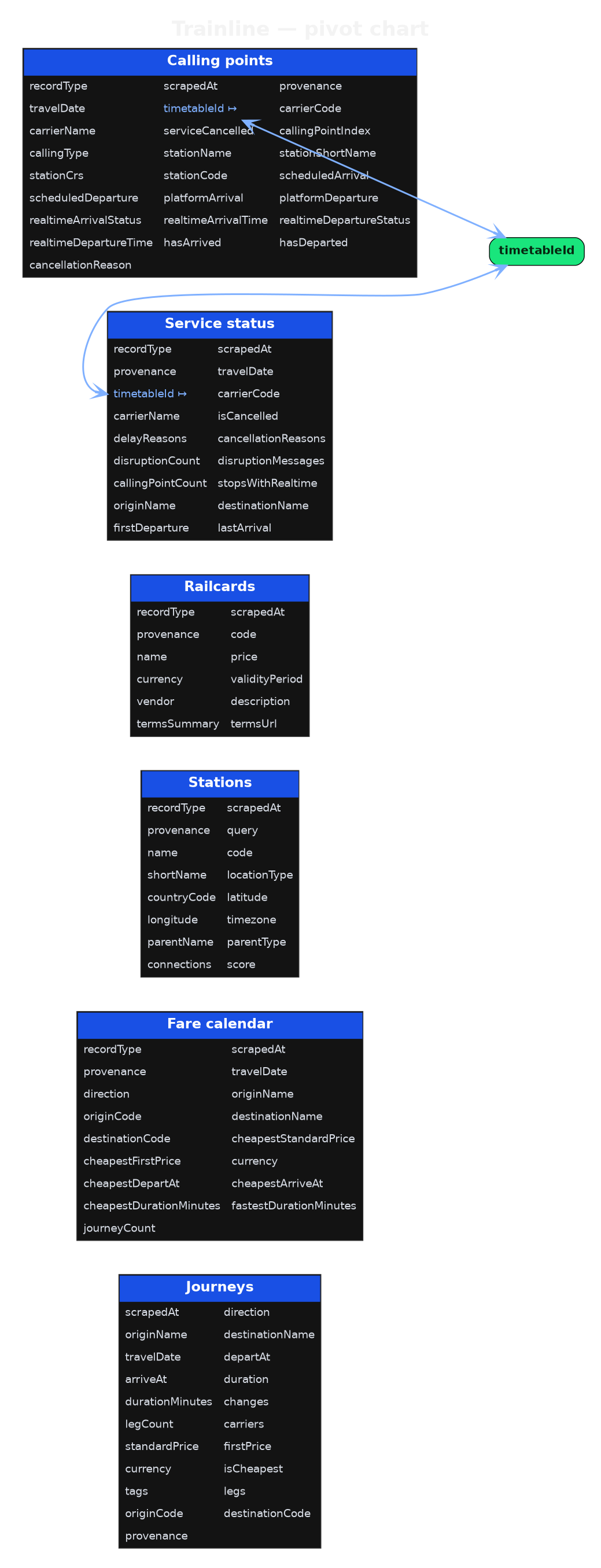
How Trainline’s data connects. Each box is a dataset; a highlighted field (↦) is a join key and the mint pill is that key as a pivot point. Follow an arrow from the dataset that gives you a key to the datasets it unlocks (a double-headed arrow means you can pivot either way) — hold a journey or station id and step between the related datasets.
Trainline Calling points columns, generated from the actor dataset schema.
Read it →Trainline Fare calendar columns, generated from the actor dataset schema.
Read it →Trainline Journeys columns, generated from the actor dataset schema.
Read it →Trainline Railcards columns, generated from the actor dataset schema.
Read it →Trainline Service status columns, generated from the actor dataset schema.
Read it →Trainline Stations columns, generated from the actor dataset schema.
Read it → Apify Actors by rl1987